README and project docs
Read the project's README.md and its other Markdown files in Joppa, and run their command blocks in one click with Pro.
Joppa shows the docs the project holds: its README.md, the other .md files at its root and those of its docs/ folder. Everything is rendered, read-only: how to install the project, run it, deploy it, without opening your editor.
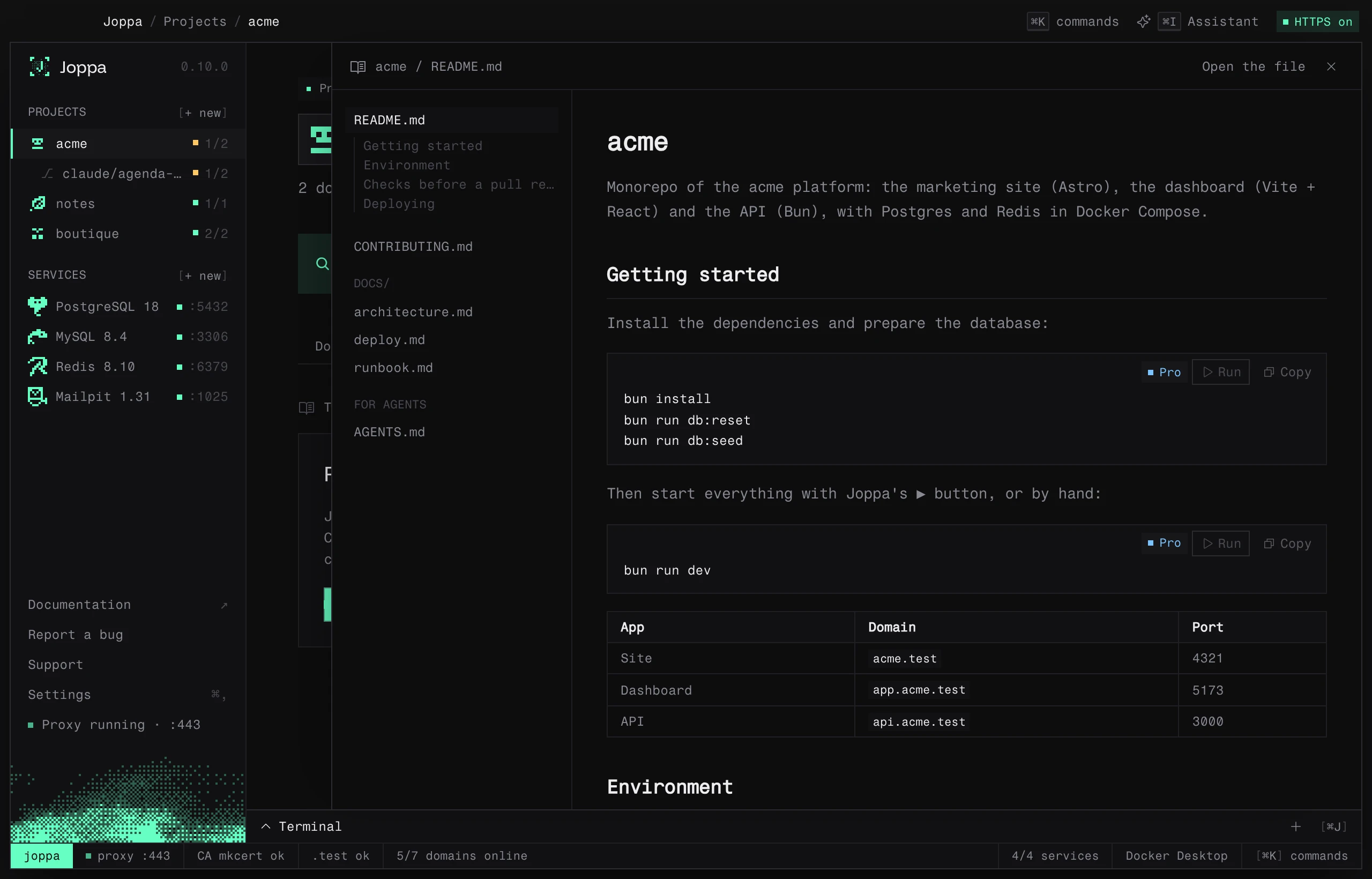
Open the docs
When the project has at least one of these files, a button shows in the project’s header, next to Open: README if the project has one, Docs otherwise. M does the same. The panel also opens from:
- the project’s … menu (Read the docs);
- the ⌘ K palette;
- the Read reminder at the top of the Processes and Services tabs.
The panel opens on the right, over the current tab, which stays usable, and leaves the terminal in view below. Esc, the cross or M close it. When it opens again, the file read last is still there.
Drag the panel’s left edge to widen or narrow it: Joppa remembers its width, and a double-click on that edge sets it back to the default. When the panel is narrow, the list of files becomes a menu above the text.
What Joppa reads
| Group | Files |
|---|---|
| First | README.md, whatever its case (readme.md, Readme.md…), opened first |
| Root | the other .md at the root: CONTRIBUTING.md, DEPLOY.md, CHANGELOG.md… |
| docs/ | the .md of the docs/ (or doc/) folder and its subfolders, 4 levels deep at most, 50 files at most |
| For agents | AGENTS.md, CLAUDE.md and GEMINI.md, written for coding agents but often useful (test and build commands), last |
Hidden folders and dependency folders (node_modules, vendor, target, dist, build) are skipped, and nothing is read outside the root and docs/. The list is read again each time the panel opens; past 512 KB, the end of a file is cut.
Reading
The files are listed on the left; under the open one, its level 2 and 3 headings (when it has at least three) lead to each section. GitHub’s Markdown is supported: headings, lists, tables, task lists, quotes, code blocks.
- A link to another file of the docs (
docs/deploy.md,runbook.md#rollback) opens it in the panel, at the right section. - A link to a web page opens in the browser; a link to another file of the project opens it with its app.
- Images hosted on the web show; images from the project’s folder are replaced by their alt text.
- Open the file, at the top of the panel, opens the file on screen in its app, to edit it.
Copy and run a block
Every code block has a Copy button.
Blocks marked as commands (```bash, sh, shell, zsh, console, terminal or fish) also have a Run button, with Joppa Pro. It runs the block in the project’s folder, like the Run a command box of the Scripts tab: the lines are chained with && and stop at the first one that fails, and a leading $ and comments are left out. The output goes to the scripts tab of the terminal.
On the free version, the docs read and their blocks copy; Run carries a Pro badge.