Services
Plug Joppa's shared services (PostgreSQL, Redis, Mailpit…) into a project: .env variables written after a diff, Laravel test database.
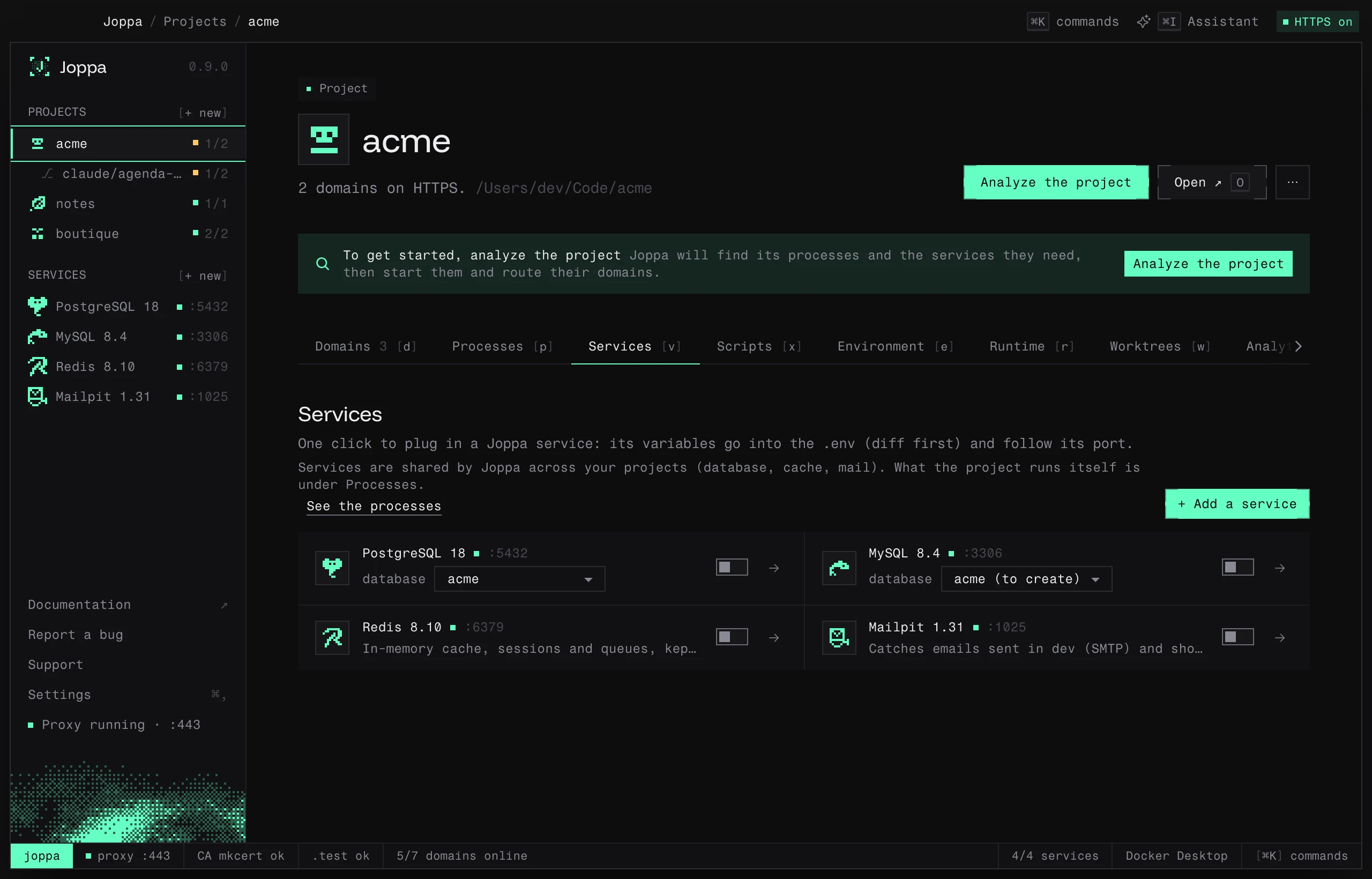
The Services tab (V) plugs Joppa’s services into the project: PostgreSQL, MySQL, Redis, Mailpit, Meilisearch… Its count shows how many services are linked. One click is enough: the service’s variables go into the .env, after a diff, and follow its port.
Services or processes
Under the intro, the tab says it: “Services are shared by Joppa across your projects (database, cache, mail). What the project runs itself is under Processes.” (See the processes).
- A Joppa service runs once for all your projects; each project has its own database in it. It’s created from the Services page and plugged in here.
- A process belongs to the project: its dev servers, workers, Docker Compose containers. It’s managed in the Processes tab.
Linked services start first with “Start all”, before the project’s processes.
Plug in a service
The services block lists Joppa’s services. Use PostgreSQL (or Redis, Mailpit…) opens a diff with two choices:
- Link and write to .env: the service’s variables are written, and kept up to date if its port changes.
- Link without writing: Joppa remembers the link, without touching the file.
A plugged service starts right away if it was stopped, including when you accept the services guessed as a project is added. For a database, if the project’s database doesn’t exist yet, Joppa creates it: the service’s row says “Database {name}, created when plugged in”, then, once plugged, a selector switches to another database of the service; if the chosen database doesn’t exist in the service, Create creates it. The lists of databases (the service’s page, the test database) update as soon as a database is created. A project uses only one service of each kind: plugging in MySQL replaces PostgreSQL.
Stop using… does the reverse: Unlink and clean up .env restores the value from .env.example (or removes the variable), Unlink without touching .env leaves the file as is. Variables you edited by hand are kept.
Plugging writes into the .env: if the .env editor (the Environment tab) has unsaved edits, the switches are disabled (“Save or discard your .env changes first”).
Which variable names
Joppa writes under the names the project already reads: those in .env, then those in .env.example (even commented out). It recognizes many aliases (DATABASE_URL, DIRECT_URL, POSTGRES_PRISMA_URL, POSTGRES_*, PG*, MYSQL_*…) and keeps the scheme and parameters of your existing URLs.
If the project declares nothing, Joppa uses its framework’s usual names:
| Service | Laravel | Others |
|---|---|---|
| Database | DB_CONNECTION, DB_HOST, DB_PORT, DB_DATABASE, DB_USERNAME, DB_PASSWORD |
DATABASE_URL (Symfony: with ?serverVersion=…&charset=utf8) |
| Redis, Valkey | REDIS_HOST, REDIS_PASSWORD, REDIS_PORT |
REDIS_URL |
| Mailpit | MAIL_MAILER=smtp, MAIL_HOST, MAIL_PORT… |
Symfony MAILER_DSN · Rails SMTP_ADDRESS, SMTP_PORT · Django EMAIL_HOST, EMAIL_PORT · Node SMTP_HOST, SMTP_PORT |
| Meilisearch | MEILISEARCH_HOST, MEILISEARCH_KEY, SCOUT_DRIVER |
Symfony MEILISEARCH_URL, MEILISEARCH_API_KEY |
| Typesense | TYPESENSE_*, SCOUT_DRIVER |
TYPESENSE_HOST, TYPESENSE_PORT, TYPESENSE_PROTOCOL, TYPESENSE_API_KEY |
The framework is recognized by its files: Laravel (artisan), Symfony, Django (manage.py), Rails, Node (package.json).
Guessed services
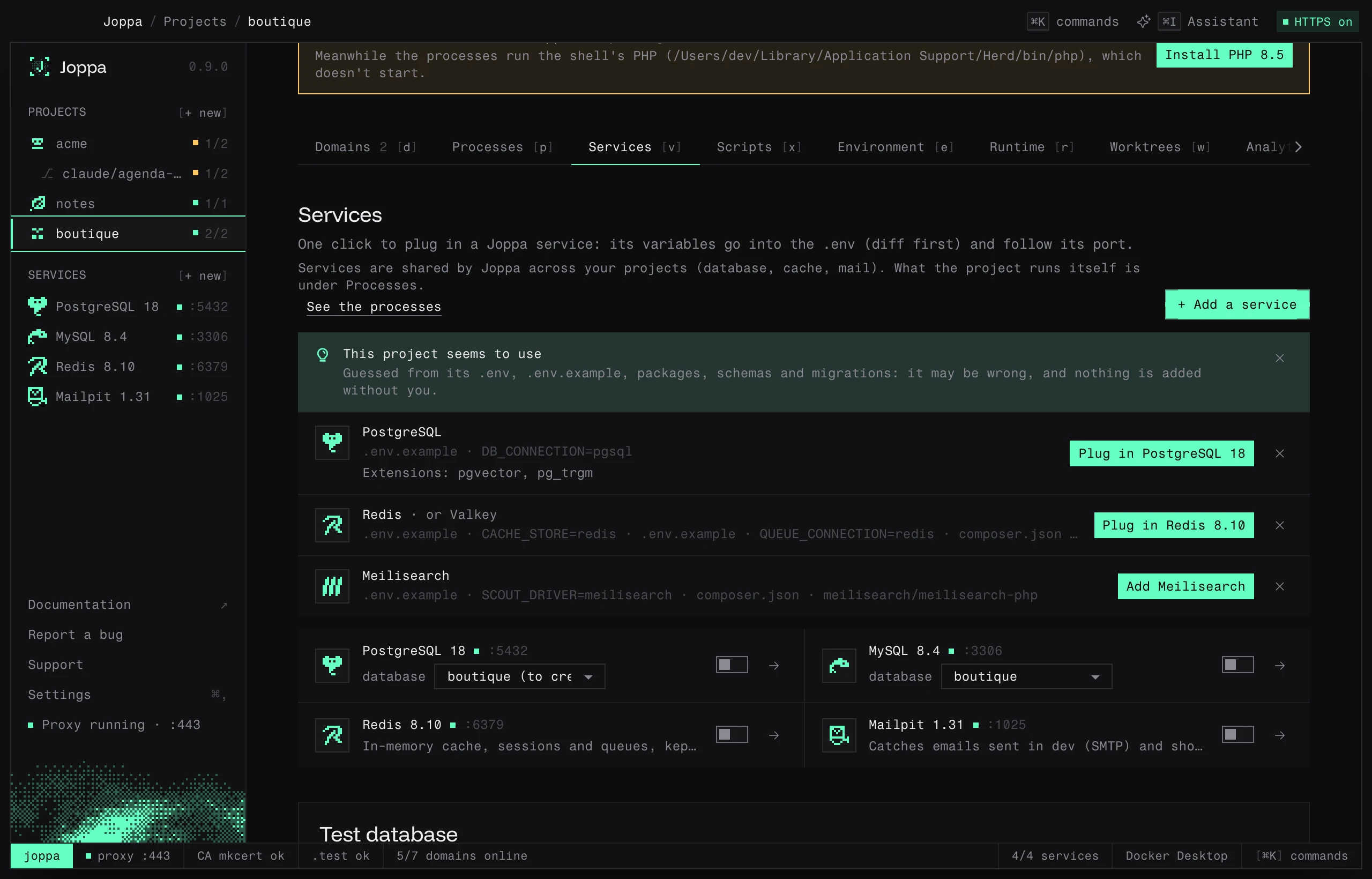
Joppa reads the project’s files to guess the services it needs, even without Docker Compose. It is only a hint: nothing is added or plugged in without you.
| Service | What gives it away |
|---|---|
| PostgreSQL, MySQL, MariaDB | DB_CONNECTION (pgsql, mysql, mariadb), the scheme of DATABASE_URL, DB_URL, POSTGRES_URL or MYSQL_URL, Prisma’s provider, Drizzle’s dialect, the packages pg, postgres, mysql2, mariadb… |
| Redis, Valkey | a Laravel driver set to redis (CACHE_STORE, SESSION_DRIVER, QUEUE_CONNECTION, BROADCAST_CONNECTION), REDIS_URL, VALKEY_URL, the packages predis/predis, laravel/horizon, ioredis, redis, bullmq, iovalkey |
| Meilisearch, Typesense | SCOUT_DRIVER, MEILISEARCH_HOST, TYPESENSE_HOST…, the packages meilisearch/meilisearch-php, typesense/typesense-php, meilisearch, typesense |
| Mailpit | a local SMTP on port 1025 (MAIL_MAILER=smtp with MAIL_PORT=1025, or SMTP_PORT=1025) |
Joppa reads the .env, then .env.example for the keys the .env lacks, composer.json, the root package.json and those of apps/*, packages/* and services/*, prisma/schema.prisma and drizzle.config.*. For the database and the cache it keeps one engine: the one the .env names wins over a schema, which wins over a package. SQLite needs no service. A lone REDIS_HOST doesn’t count: every Laravel .env.example lists it.
The result shows in two places:
- on the project page, a line “This project seems to use PostgreSQL, Redis and Meilisearch.”, with See in Services;
- at the top of this tab, the “This project seems to use” block, which shows where each service was seen (
.env.example · DB_CONNECTION=pgsql) and the engines that would do as well (Redis “or Valkey”, MySQL “or MariaDB”). Plug in PostgreSQL 18 opens the usual diff when Joppa already has a service of that engine; otherwise Add Meilisearch opens the service’s creation, then plugs it in.
PostgreSQL extensions
For PostgreSQL, Joppa also looks for the extensions the project uses:
CREATE EXTENSIONin.sqlfiles (Prisma, Drizzle and Supabase migrations,database/,db/…) and in migrations;- in Laravel migrations,
Schema::ensureVectorExtensionExists()and->vector((pgvector),uuid_generate_v4()(uuid-ossp),gin_trgm_ops(pg_trgm); - Rails
enable_extension "hstore", DjangoCreateExtension("citext"),TrigramExtension(),VectorExtension()…; - Prisma
extensions = [pg_trgm, uuid_ossp(map: "uuid-ossp")]and the typesUnsupported("vector(…)")(pgvector) orUnsupported("geometry(…)")(PostGIS); - the Compose image:
pgvector/pgvector,postgis/postgis.
Only the extensions Joppa can provide are kept: pgvector, PostGIS, pg_trgm, uuid-ossp, pgcrypto, citext, hstore, unaccent… The PostgreSQL row lists them (“Extensions: pgvector, pg_trgm”); a CREATE EXTENSION is enough on its own to guess PostgreSQL. Add PostgreSQL opens its creation with these extensions already ticked, on the server and for every new database. When the chosen server lacks an extension that must be enabled on the server (pgvector, PostGIS…), Enable pgvector opens its settings with the extension ticked, ready to save. The row stays as long as the PostgreSQL plugged into the project lacks one of them.
A service leaves the list as soon as the project uses a service of the same kind. The cross on a row ignores that service for this project; the one on the banner, or at the top of the block, ignores them all. What the project’s Docker Compose already runs is left to the Docker Compose import.
The test database (Laravel)
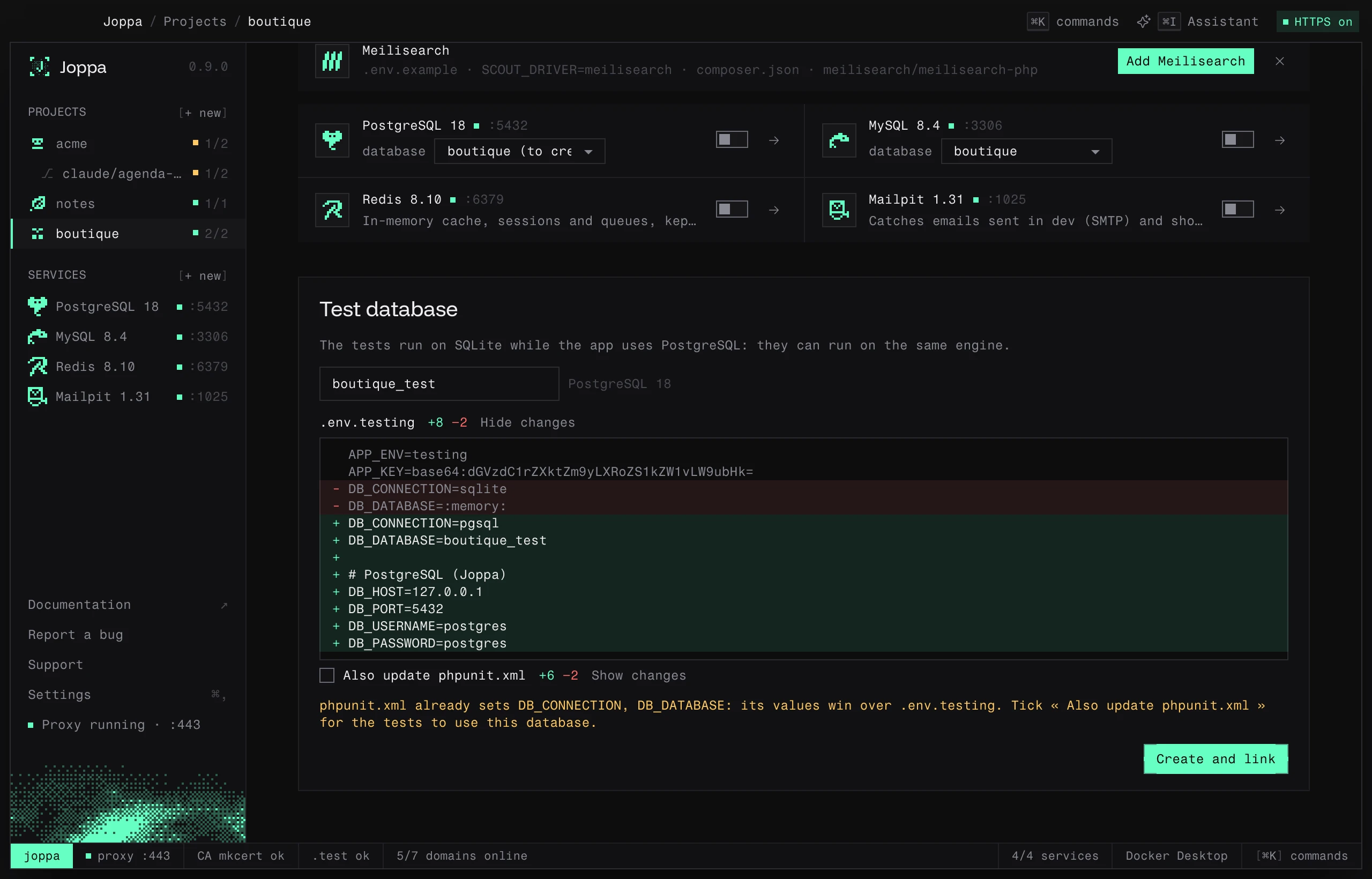
A Laravel project’s tests read their database from phpunit.xml and .env.testing. When the project has one, this tab shows a Test database block that says what they ask for:
- they ask for a given database (
phpunit.xmlsetsDB_CONNECTION=pgsqlandDB_DATABASE=shop_testing, for instance, often pointing at another tool): Joppa offers that database, under that name, in one of its services of the same engine; - they run on SQLite while the app uses PostgreSQL, MySQL or MariaDB: Joppa offers to run them on the same engine, in a
<app database>_testdatabase; - nothing is set for them: they would run on the app’s own database, which
RefreshDatabaseempties. Joppa offers a separate<app database>_testdatabase.
If the app and the tests both run on SQLite, there is nothing to offer and the block does not show.
The service is the one the project already uses (else the first of the right engine), and the database name can be edited. Create and link starts the service if needed, creates the database if it is missing and writes DB_CONNECTION, DB_HOST, DB_PORT, DB_DATABASE, DB_USERNAME and DB_PASSWORD. Each file has its diff (Show changes); a filled-in DB_URL is emptied, since it would win over these values.
When the files already point at a database that doesn’t exist in the service, the block says so (“The … database doesn’t exist yet in …”) and Create the database creates it, starting the service if needed.
| The project has | Joppa writes to |
|---|---|
.env.testing and phpunit.xml |
.env.testing, and phpunit.xml only if you tick Also update phpunit.xml |
.env.testing alone |
.env.testing |
phpunit.xml alone |
phpunit.xml (or phpunit.xml.dist when it is the only one) |
In phpunit.xml, Joppa only touches the <env name="DB_…"> tags: it changes their value, uncomments those Laravel ships commented out, and adds the missing ones at the end of <php> with the same indentation. The rest of the file stays as it is. Before the first write, each file is copied next to it (phpunit.xml.joppa-backup, .env.testing.joppa-backup), and a file changed on disk since the preview is not overwritten.
The same choice is offered when you add a Laravel project and when you create one.