Databases
PostgreSQL, MySQL and MariaDB in Joppa: one database per project, extensions (pgvector, PostGIS…), connection URLs, TablePlus, import and export, copies and snapshots.
Joppa runs one server per engine on a fixed port; each project gets its own database on it. It’s lighter than one container per project, and your tools always connect to the same place.
PostgreSQL, MySQL and MariaDB are in the free version, one server of each. Several servers of the same engine (two PostgreSQL in two versions, for example) need Joppa Pro. See License and plans.
Create a database
On the service page, Databases section: + New database. Give it a name, choose the project to connect and, for PostgreSQL, its extensions.
Usually you don’t even have to: plugging the service into a project in the Environment tab creates the project’s database if it doesn’t exist.
The databases table shows their size, extensions and project. Each database’s menu: Extensions…, Copy URL, Export…, Import into this database…, Duplicate…, Snapshots…, Delete….
Connect
| Engine | URL |
|---|---|
| PostgreSQL | postgresql://postgres:[email protected]:5432/<database> |
| MySQL, MariaDB | mysql://root:[email protected]:3306/<database> |
These are development credentials, on a server that only listens on your machine.
TablePlus
Open in TablePlus (on the service or on a database) opens the connection, already named “Joppa · database” and tagged green as a local environment.
From the terminal
joppa dbs postgres          # databases and their URLs
joppa dbs postgres --json   # for a script
PostgreSQL extensions
Installed on the server
Some extensions need files on the server. Pick them in Version, port and extensions…: Joppa builds a local PostgreSQL image that includes them, on the next start (a few minutes the first time). Existing databases are kept.
| Extension | Use |
|---|---|
pgvector (vector) |
Embeddings and similarity search |
| PostGIS | Geographic data |
| pgRouting | Route calculation (with PostGIS) |
| HypoPG | Hypothetical indexes |
| pg_partman | Partitioning |
| pg_stat_statements | Query statistics (preloaded) |
Always available
pg_trgm, uuid-ossp, pgcrypto, citext, hstore, unaccent, fuzzystrmatch.
Per database
Extensions… on a database enables or removes them. Unchecking an extension removes it from the database along with what depends on it (vector columns, geometries…).
Enabled by default in new databases chooses the ones that are pre-checked when creating a database, and present in databases created by an external tool (a migration, createdb).
MySQL and MariaDB
MySQL is the official image (LTS and innovation releases), MariaDB its community fork, compatible with the same clients. Both use port 3306 by default: if you run both, the second one takes 3307.
Export a database
Export…, in a database’s menu, saves it to a file where you choose:
| Format | Contents |
|---|---|
.sql.gz (suggested) |
SQL compressed with gzip |
.sql |
Readable SQL |
.dump (PostgreSQL) |
The pg_dump -Fc archive, read back by pg_restore |
The file holds no owners or grants (pg_dump --no-owner --no-acl) and no CREATE DATABASE (mysqldump --single-transaction --routines --triggers --events): it loads under any name, here or elsewhere.
Import a file
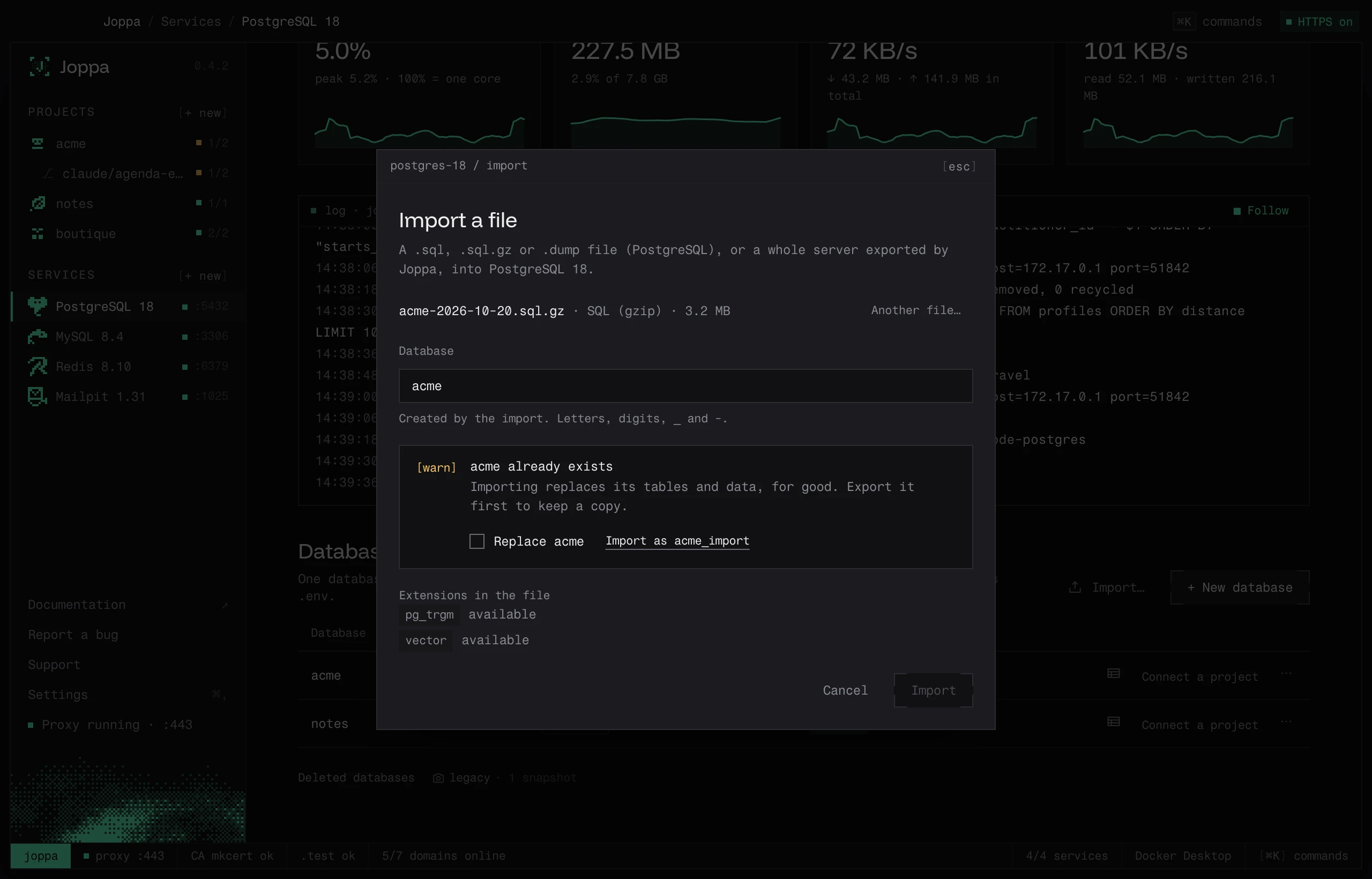
Import…, above the databases table, loads a file into the server. Import into this database…, in a database’s menu, does the same aimed at that database. Joppa reads:
- a
.sqlor.sql.gzfile, from PostgreSQL, MySQL or MariaDB; - a PostgreSQL
.dumparchive (pg_dump -Fc); - the export of a whole server: the one from Export the databases (.sql)…, from
pg_dumpallor frommysqldump --all-databases.
Before running anything, Joppa reads the file and shows:
- the database it goes to, named after the file (
acme-2026-10-23.sql.gzgivesacme) and editable. If it exists, tick Replace acme or take the suggested name (Import as acme_import); - for the export of a whole server, the databases it creates, and those that already exist and will be replaced: tick Replace these databases;
- the PostgreSQL extensions in the file: available, enable it on the server first (in Version, port and extensions…), or not offered by Joppa. What depends on a missing extension doesn’t load.
During the import, a bar follows the reading of the file. At the end, Joppa sums up the errors skipped on the way (an unknown role, a missing extension). If the restore fails, the client’s message (psql, pg_restore, mysql) is shown and the database the import created is removed.
Joppa adapts the file as it reads it: it removes the OWNER TO and DEFINER= clauses that name another server’s accounts, replaces MySQL 8’s utf8mb4_0900_* collations with utf8mb4_unicode_ci for MariaDB, and, in the export of a whole server, leaves out the system databases (mysql, sys…) and Joppa’s own account.
Duplicate a database
Duplicate… creates a copy on the same server, with its tables, data and extensions (acme_copy by default). PostgreSQL copies the database’s files (CREATE DATABASE … TEMPLATE) when nobody is connected to it, and otherwise goes through an export and a restore; MySQL and MariaDB always go through an export.
Snapshots
With Joppa Pro, Snapshots…, in a database’s menu, opens its snapshots: copies of the database kept by Joppa, restored in one click.
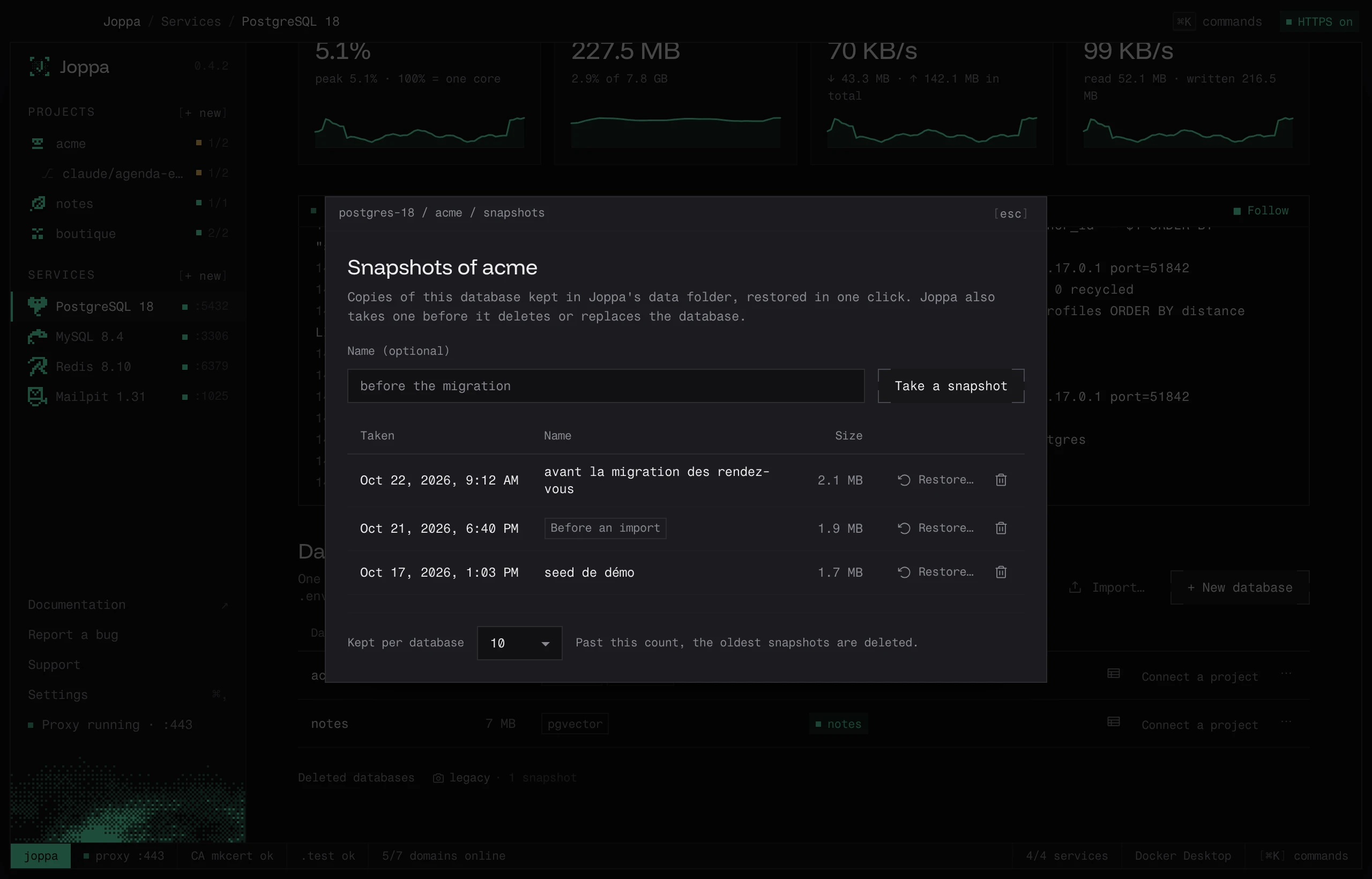
- Take a snapshot, with a name if you like (“before the migration”).
- Restore… brings the database back to that snapshot. What it held is first kept in a new snapshot, “Before a restore”.
- The bin deletes a snapshot.
- Kept per database: past this count (10 by default), the oldest are deleted.
Automatic snapshots
With Joppa Pro, Joppa takes a snapshot before every operation that erases data. If it fails, the operation doesn’t happen.
| Operation | Snapshot label |
|---|---|
| Delete a database | Before deletion |
| Import a file that replaces a database | Before an import |
| Import from Docker Compose replacing a database | Before a Compose import |
| Restore a snapshot | Before a restore |
The snapshots of a deleted database stay: they show under the table, in Deleted databases, and restoring one creates the database again.
Snapshots live in Joppa’s snapshots/ folder (see Files and folders): one .dump (PostgreSQL) or .sql.gz (MySQL, MariaDB) per snapshot, with a .json that describes it. Without Joppa Pro, the list stays visible and its snapshots can be deleted, but not taken or restored.
From the terminal
joppa db export postgres acme                       # ./acme-2026-10-23.sql.gz
joppa db export postgres acme ~/acme.dump           # PostgreSQL archive
joppa db import postgres ~/acme.sql.gz --into acme_test
joppa db import postgres ~/acme.sql.gz --replace    # replaces acme
joppa db clone postgres acme acme_feature
joppa db snapshot postgres acme --name "before the migration"
joppa db snapshots postgres acme
joppa db restore postgres acme 20261023-142501
See The joppa command.
Export the databases
Export the databases (.sql)…, in the ⋯ menu of a PostgreSQL, MySQL or MariaDB server, saves all its databases into one SQL file (pg_dumpall, or mysqldump --all-databases) where you choose. A stopped server is started for the export, then stopped again.
Exporting still works for a server the free version locks (see License and plans): your data stays yours. To put such a file back into a server: Import a file.