Node, bun and PHP versions
Pin the Node version, package manager and PHP version per project, with Vite+ and static PHP builds.
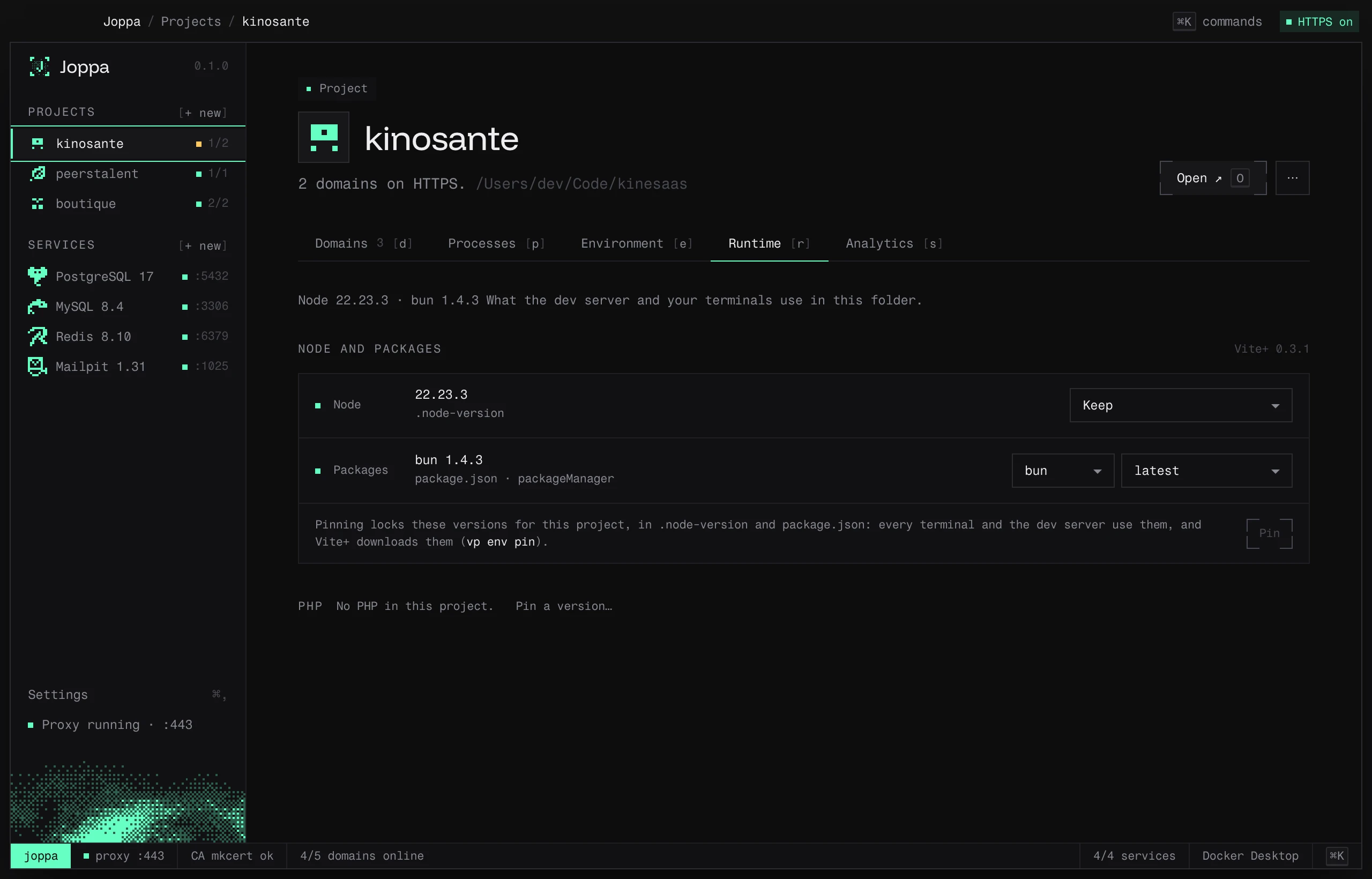
The Runtime tab (R) shows what the dev server and your terminals use in the project folder, and lets you pin it.
Node and the package manager
Joppa relies on Vite+, which downloads the Node version and package manager (bun, pnpm, npm, yarn) pinned by each project. Nothing to install: Joppa installs Vite+ at first launch, with Node LTS and bun, then updates it every day. A Vite+ already on your machine is picked up and updated the same way. While it installs, the tab and the New project window say so; if it fails (offline), Retry runs it again.
- Node version: Keep, Latest LTS or a specific version.
- Package manager and its version.
- Pin writes
.node-versionand thepackageManagerfield ofpackage.json: every terminal and the dev server then use these versions (vp env pin).
Joppa reads versions in this order: devEngines, then a version file (.node-version, .nvmrc), then engines.
Node in your terminals
Joppa installs Vite+ without touching your shell profile. For your terminals to get node, bun, pnpm, npm and yarn in the pinned versions, Settings › Node › Use Joppa’s Node in my terminals adds this block, after you confirm:
# >>> Joppa (Node) >>>
. "/Users/you/.config/vite-plus/env"
# <<< Joppa (Node) <<<
The file depends on your shell, as for PHP. If your profile already loads Vite+ (installed with its own command), the switch is on and Joppa adds nothing. Open a new terminal after the change.
PHP
Joppa downloads static PHP builds (static-php.dev), from 8.1 to 8.5, and stores them in its folder.
- Pin a version…: choose the version; Install and use downloads it if needed and writes
.php-versionat the project root. - Unpin deletes
.php-version.
Extensions
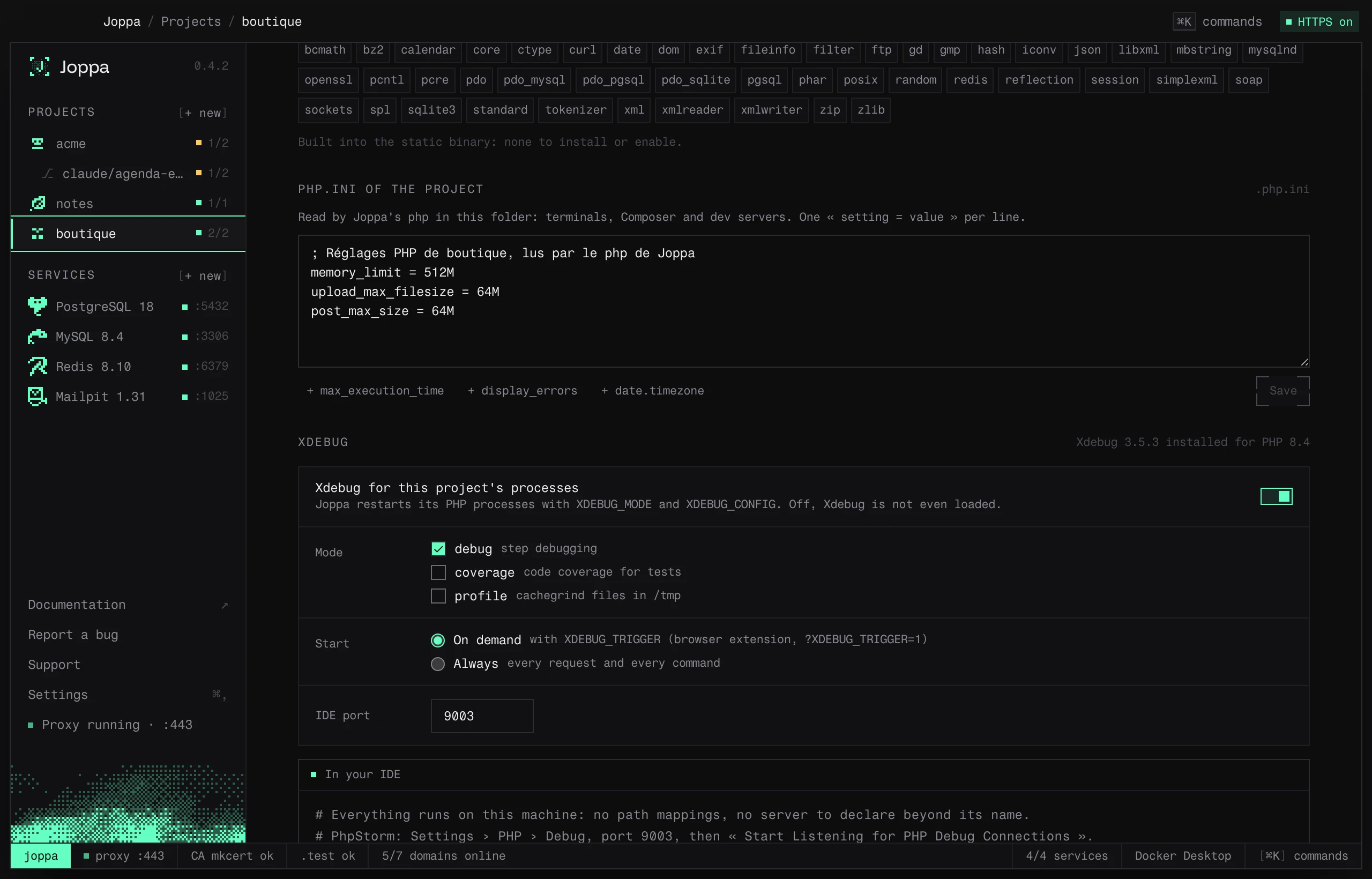
The Extensions list shows what the pinned build contains (php -m): bcmath, curl, gd, mbstring, pdo_mysql, pdo_pgsql, pdo_sqlite, pgsql, redis, soap, zip… They’re built into the static binary: there’s nothing to install or enable, and an extension missing from the list (intl, opcache) can’t be added.
The project’s php.ini
php.ini of the project writes the project’s PHP settings in a .php.ini file at its root, one setting = value per line:
memory_limit = 512M
upload_max_filesize = 64M
post_max_size = 64M
The + memory_limit, + upload_max_filesize… buttons add the most common settings. Save checks the file with PHP, then restarts the project’s running PHP processes. An empty field deletes the file.
Joppa’s php command reads the nearest .php.ini (this folder or a parent) and passes it to PHP through the PHPRC variable: your terminals, Composer, php artisan serve and the workers all read it. Without a .php.ini, PHP keeps its defaults (memory_limit = 128M…). The system PHP isn’t affected: it keeps its own php.ini. Commit the .php.ini to share it with the team.
Xdebug
The static builds from static-php.dev don’t have Xdebug. Joppa provides its own, built for each PHP version (8.1 to 8.5) and downloaded from download.getjoppa.com, with its checksum verified, the first time you need it: Install Xdebug.
| Setting | Effect |
|---|---|
| Xdebug for this project’s processes | Restarts the project’s PHP processes with XDEBUG_MODE and XDEBUG_CONFIG |
| Mode | debug (step debugging), coverage (test coverage), profile (cachegrind files in /tmp), one or more |
| Start | On demand: only with XDEBUG_TRIGGER (Xdebug Helper browser extension, ?XDEBUG_TRIGGER=1, cookie); Always: every request and every command |
| IDE port | 9003 by default, Xdebug 3’s |
Xdebug is only loaded if XDEBUG_MODE is set: off, it slows nothing down. Each change restarts the running PHP processes. The project’s worktrees follow its settings.
In a terminal, Joppa’s php command loads Xdebug the same way:
XDEBUG_MODE=coverage php artisan test --coverage
XDEBUG_MODE=debug XDEBUG_TRIGGER=1 php artisan app:importPhpStorm and VS Code
Everything runs on your machine, in the project folder: no path mappings to set up.
- PhpStorm: Settings › PHP › Debug, port
9003, then Start Listening for PHP Debug Connections (the phone icon). On the first connection, accept the suggested server (shop.test). - VS Code: the PHP Debug extension (xdebug.php-debug), with this
launch.json:
{
  "version": "0.2.0",
  "configurations": [{ "name": "Joppa", "type": "php", "request": "launch", "port": 9003 }]
}
PHP in your terminals
Joppa puts a php command and a composer command in its bin folder; they read the .php-version of the current folder (or a parent). For your terminals to use them, this folder must come first in your PATH.
Add it for me… (or Settings › PHP › Use Joppa’s PHP in my terminals) adds this block to your shell profile, after confirmation:
# >>> Joppa (PHP) >>>
export PATH="/Users/you/Library/Application Support/joppa/bin":"$PATH"
# <<< Joppa (PHP) <<<| Shell | File changed |
|---|---|
| zsh | ~/.zshrc |
| bash | ~/.bash_profile (macOS), ~/.bashrc (Linux) |
| fish | ~/.config/fish/conf.d/joppa.fish (with fish_add_path --prepend) |
You remove the block from the same settings. Open a new terminal after the change.
Outside pinned projects
Settings › PHP › Outside pinned projects chooses the PHP used everywhere else: the system’s or a Joppa version.
Composer
Settings shows which Composer is used (Joppa’s or the system’s). Download Composer installs it in Joppa, after verifying its checksum.