Settings
Each section of Joppa's Settings and what it controls, from the proxy to the appearance.
Open Settings with ⌘ , or from the sidebar. Sections are numbered, with a table of contents on large windows.
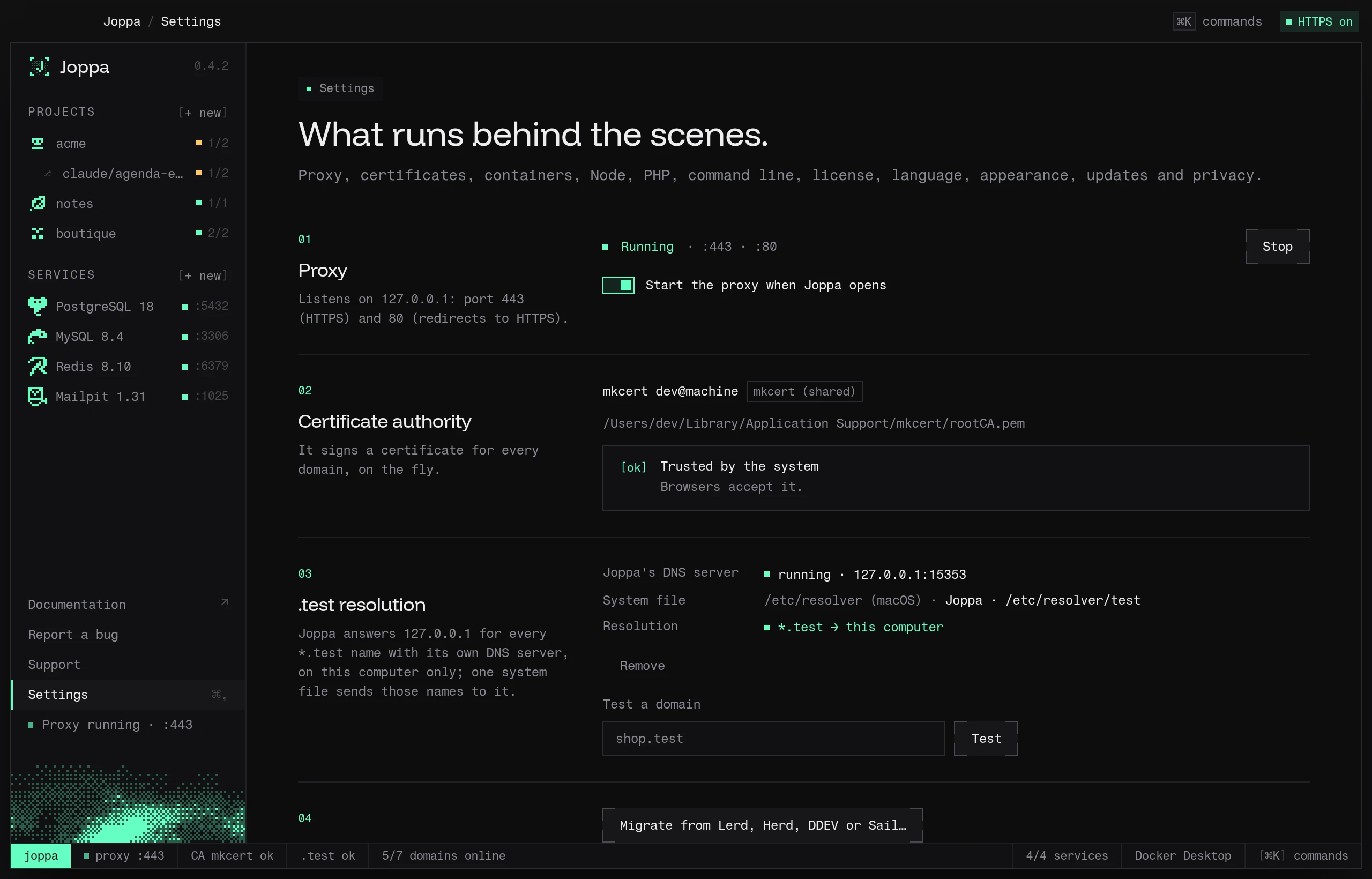
Proxy
Listens on 127.0.0.1: port 443 (HTTPS) and 80 (redirects to HTTPS). Status, Start / Stop, and Start the proxy when Joppa opens (on by default). If another server holds port 80, the section names it and offers Free port 80. See HTTPS proxy and Ports 80 and 443 in use.
Certificate authority
It signs a certificate for every domain, on the fly. Subject, origin (“Joppa” or “mkcert (shared)”), certificate path, trust status, an Approve the authority button (the system asks for your password) and the equivalent terminal command. See Certificates.
.test resolution
How *.test leads to your machine: the status of Joppa’s DNS server (127.0.0.1:15353), the system file that sends those names to it (Joppa’s, or another tool’s such as Laravel Herd), and whether a .test name really resolves to this machine. Set up (or Repair, Use Joppa’s resolver) writes the file with your password; Remove takes it away. The equivalent terminal commands, and Test a domain, which tells you why a domain won’t open. See Resolving .test domains.
Migrate to Joppa
Migrate from Lerd, Herd, DDEV or Sail… opens the migration of their sites: projects, domains, databases and .env. See Migrating from Lerd, Herd, DDEV or Sail.
Containers
- Runtime: Automatic (the first one running), OrbStack, Docker Desktop, Colima or Podman.
- Custom start command: run by the “Start” button instead of the runtime’s own command.
See Container runtimes.
Node
- The Vite+ version, when it was last checked and Update (or Install Vite+ / Retry when it is missing). Joppa installs it at first launch and updates it every day.
- Use Joppa’s Node in my terminals: adds or removes the Joppa (Node) block in your shell profile. On and greyed out if your profile already loads Vite+.
See Node, bun and PHP versions.
PHP
- Use Joppa’s PHP in my terminals: adds or removes the Joppa block in your shell profile.
- Outside pinned projects: system PHP or a Joppa version.
- Installed versions, and Composer (Download Composer).
The php.ini and Xdebug are set per project, in its Runtime tab: see The project’s php.ini and Xdebug. Xdebug settings are kept in config.json (the project’s xdebug field), on this machine only.
See Node, bun and PHP versions.
Command line
- Install joppa / Reinstall: puts the command on your
PATH. - Connect the assistants: registers the MCP server in Claude Code, Claude Desktop and Cursor.
See The joppa command and MCP server.
License
Current plan, account, key, machine, last check. Sign in, Enter a key, Verify, Deactivate this Mac. See License and plans.
Language
English, Français, Español or 中文. Changes the app and its menu bar menu.
Appearance
| Setting | Choices |
|---|---|
| Theme | System, Light, Dark (default) |
| Frame | Glass (native blur) or Solid |
| Icon | Halo, Sky or Dithered, in the Dock and the sidebar (Finder keeps Halo) |
Updates
The installed version, when Joppa last checked, and Check for updates. Joppa looks for a new version at launch, each time you open its window again, then every six hours.
| Setting | Default |
|---|---|
| Download new versions automatically | On. Off, the sidebar card offers Download and install |
Privacy
What Joppa sends to get better, only if you agree, and its own logs. Shortly after the first launch, Joppa asks once, in the Help improve Joppa window: both settings start off there, No thanks leaves them off and Save my choices keeps what you turned on. Closed without an answer, the window comes back at the next launch.
| Setting | Default | What is sent |
|---|---|---|
| Send crash reports | Off | When Joppa or its interface crashes: the error message, where it happened in Joppa’s code, Joppa’s version and your system. The same error is sent once per launch |
| Share anonymous usage statistics | Off | The screens opened and the actions taken (add a project, create a service, start sharing…), with a few labels at most (a service’s engine, a project’s template) and, at launch, the number of projects and services. Sent in batches, once a minute |
Never a project name, domain, path, file content or .env: your home folder is written ~ in errors. Everything goes to PostHog, hosted in the European Union, under a random ID (telemetry.json) not linked to your licence or your machine, with no person profile and no geolocation. A crash report is written to crashes/ before it is sent: if it couldn’t go, it goes at the next launch. Turning reports off deletes the waiting ones. See also the privacy policy.
Joppa’s logs: what Joppa does and the errors it meets, in logs/joppa.log (5 MB, then joppa.1.log, 10 MB at most). They stay on this computer; Show the logs opens them in the file manager, and Report a bug can attach the latest lines.
Uninstall
Uninstall Joppa… removes what Joppa installed on this machine, the joppa command included: you tick what goes. See Files and folders › Removing everything.
Settings without a UI
config.json also holds the proxy ports (443, 80) and the TLD (test). They can’t be changed from the app.
The number of snapshots kept per database (snapshotsKeep, 10 by default) is set in a database’s Snapshots… window: see Snapshots.