Add a project
How Joppa analyzes a folder, names the project, finds its dev servers and suggests domains for them.
Three ways to add one
- Drag and drop: drop a folder anywhere on the window (“Drop to add the project”).
- Button or shortcut: + new next to Projects in the sidebar, Add a project on the home screen, or N anywhere.
- Terminal: in the TUI, the a key on the Projects section, or the
add_projectMCP tool.
The Add a project window shows what Joppa found; nothing is saved until you confirm (⌘ ⏎).
Name and icon
The name comes from the name field of package.json (without the @org/ scope), otherwise from the folder name. It’s converted to lowercase, without accents or spaces: Kiné Santé becomes kine-sante.
The icon is generated from the name. Change it any time with I on the project page: generated patterns, initials, pictograms, or your own image (.svg, .png, .jpg, .webp, 180 KB max), dithered in Joppa’s colors.
What Joppa detects
| Stack | Clue | Default port |
|---|---|---|
Vite, Vite+ (vp), React Router, Remix, SvelteKit |
dev script |
5173, or port: in vite.config |
| Astro | dev script |
4321, or port: in astro.config |
| Next.js | dev script |
3000 |
| Nuxt | dev script |
3000 |
| Angular, Nx (Angular, webpack) | ng serve, Nx target |
4200 |
| Create React App, Docusaurus | react-scripts start, docusaurus start |
3000 |
| Vue CLI, Gatsby, Storybook, Expo | their command | 8080, 8000, 6006, 8081 |
| Node (other server) | port written in the script or in the code | the one found |
| Laravel | artisan file |
8000 (php artisan serve) |
| Symfony, other PHP | public/index.php and composer.json |
8000 (php -S) |
| Bun | bun.lock / bun.lockb |
— |
| Docker Compose | compose.yaml, docker-compose.yml… |
published ports |
Joppa reads the dev script at the root and in every package of a monorepo: npm, yarn or bun workspaces, pnpm-workspace.yaml, lerna.json, Nx projects. A port is recognized in these forms: --port 3000, -p 3000, --port=3000, PORT=3000, ${PORT:-3000}. The details are in Processes.
For Laravel, the base domain goes to php artisan serve; the Vite server, which only serves the assets, doesn’t get one.
Suggested subdomains
With a single server, the project gets the base domain: myproject.test. In a monorepo, each app gets a subdomain based on its folder name:
| App folder | Domain |
|---|---|
web, app, frontend, client, dashboard |
app.myproject.test |
marketing, site, www, website, landing, home |
myproject.test |
api, server, backend |
api.myproject.test |
other (docs, admin…) |
docs.myproject.test |
Two apps that would end up with the same name are numbered: app, app2.
Docker Compose web interfaces
Compose services that publish a known web interface get their own domain too:
| Service | Port | Domain |
|---|---|---|
| Mailpit, MailHog | 8025 | mail.myproject.test |
| MinIO (console) | 9001 | minio.myproject.test |
| RabbitMQ (management) | 15672 | rabbitmq.myproject.test |
| Adminer | 8080 | adminer.myproject.test |
| phpMyAdmin | 80 | phpmyadmin.myproject.test |
| pgAdmin | 80 | pgadmin.myproject.test |
Other published ports (databases, caches) are listed as “Not routed (not web interfaces)”. If the Compose file contains PostgreSQL, MySQL, MariaDB, Redis or Valkey, the window also offers to import their data into Joppa: see Import from Docker Compose.
A repository with joppa.toml
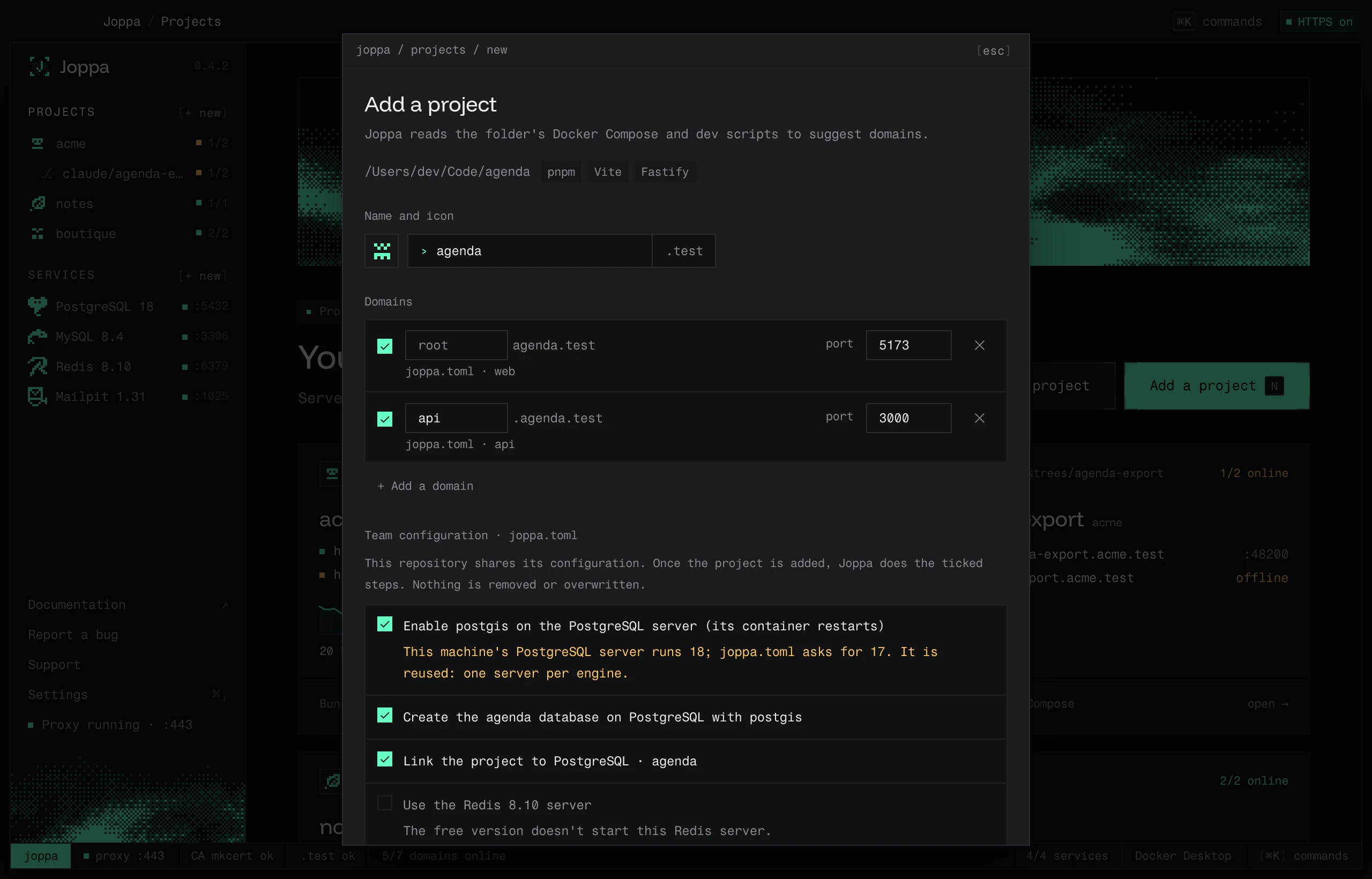
When the folder contains a joppa.toml (the configuration a team shares), the window starts from it:
- the name is the one in its
[project]section; - the domains are its
[[domain]]entries, with “joppa.toml” shown as the source; - under Team configuration · joppa.toml, the plan lists the rest, one step per line: create the server or reuse the machine’s, create the database with its extensions, link the project, write the
.env(Show the diff), pin Node, the package manager and PHP, set up worktrees. Steps already in place are collapsed under “already in place”.
Untick what you don’t want: the steps that depend on it are unticked with it. A step that can’t be done here is greyed out with the reason: an engine reserved for Joppa Pro, a domain already taken by another project. Discrepancies are pointed out without blocking anything: a PostgreSQL server on the machine in a different version from the one asked for is reused, and a .node-version in the repository takes precedence over the [runtime] section.
Add and prepare (⌘ ⏎) adds the project, then does the ticked steps. Nothing is removed or overwritten, and no process is started: they wait in the Processes tab.
Later, when a git pull changes the file, the project page points it out and offers to apply the change: see Applying the file.
No server detected?
Add the domains by hand: a subdomain (admin) or a full domain, and a port. You can always add more later in the Domains tab.
The project page
Once added, the project has its own page, with these tabs:
| Tab | Shortcut | Contents |
|---|---|---|
| Domains | D | Domains, targets and status |
| Processes | P | Dev servers and containers started by Joppa |
| Environment | E | Linked services and the .env editor |
| Runtime | R | Node, package manager and PHP versions |
| Worktrees | W | One environment per git worktree |
| Analytics | S | Traffic, latency, errors and uptime |
| Inspector | Q | The last requests, their headers and bodies, and replaying them |
The Actions menu (⋯) lets you Rename… (with the “Rename the domains too” option), Change icon…, Share the configuration in joppa.toml (see joppa.toml), Show in Finder and Remove from Joppa. Removing a project stops its dev servers and forgets its local configuration; its folder and any joppa.toml are left untouched.