Worktrees
One environment per git worktree: its own domains, ports, .env and database, to run several branches (or several coding agents) side by side.
A git worktree is a second working copy of the repository, on another branch, in another folder. Joppa turns it into an environment: the same application, with its own domains, its own ports, its own .env and, if you like, its own database. You keep main online while a branch (or an agent like Claude Code) works next to it, with no port or data conflicts.
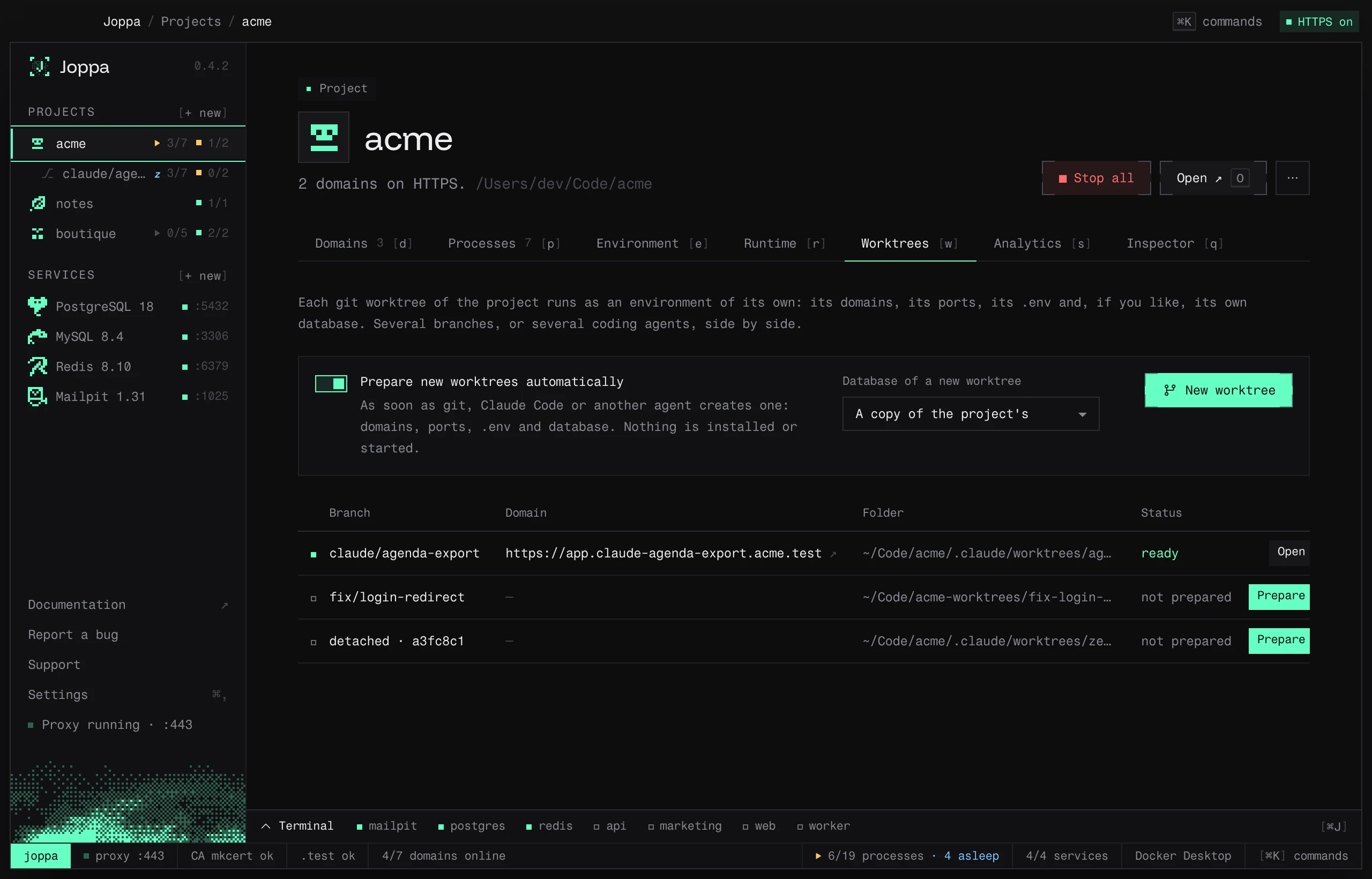
A project’s Worktrees tab (W) lists its worktrees. It appears for projects whose folder is a git repository.
What a worktree gets
Its domains
The branch name becomes a label of the domain: feature/Login UI gives feature-login-ui (a detached worktree takes its folder’s name).
| Project domain | Worktree domain |
|---|---|
myproject.test |
feature-login-ui.myproject.test |
app.myproject.test |
app.feature-login-ui.myproject.test |
If that name is already taken (an api branch when the project has api.myproject.test), Joppa adds a number: api-2. The certificates cover these domains with nothing to do. Only the domains that point to one of the project’s dev servers are carried over.
Its ports
Each dev server gets a port of its own: the project’s port + 100, + 200… (5173 → 5273), otherwise a free port between 41000 and 49999. Never another project’s port, nor a port already in use.
Joppa passes it on in the way the server understands:
- the variable Joppa already fills in (
${PORT:-3000}in the script,SERVER_PORTforphp artisan serve,REVERB_SERVER_PORTfor Reverb); - the variable the server reads (
API_PORTin its code,PORTin its.env); - the port written in the script (
vite --port 5173), rewritten; --portfor Vite, Astro, Next.js, Nuxt, Angular, Wrangler, Storybook, Vue CLI, Docusaurus, Gatsby, VitePress and Expo (withPORTas well);PORTfor Create React App.
A server whose port is only set in the code, with no variable, can’t be moved: Joppa leaves it unchecked from “Start all” and says so.
A server that reads another one’s address from a variable with a default value (process.env.API_URL ?? "http://localhost:47400") gets the new address: the worktree’s front end talks to the worktree’s API, not the project’s.
Docker Compose services stay the project’s: the worktree uses them without starting a second copy (their ports are fixed).
Its .env
Git doesn’t copy the files it ignores. Joppa copies into the worktree the ones it’s missing: .env, .env.local, .env.development, .env.development.local, .dev.vars (Wrangler) and the .php.ini, and the version pins (.php-version, .node-version, .nvmrc, .tool-versions) when they were never committed, at the root and in each dev server’s folder. It replaces the addresses in them: localhost:5173 → localhost:5273, VITE_PORT=5173 → 5273, https://app.myproject.test → https://app.feature-login-ui.myproject.test.
Its database
For each database the project uses in a Joppa service:
| Choice | What Joppa does |
|---|---|
| A copy of the project’s (default) | Creates myproject_feature_login_ui from the project’s database: TEMPLATE for PostgreSQL (instant), otherwise a copy through a dump (PostgreSQL in use by a running server, MySQL, MariaDB) |
| An empty one | Creates an empty database; for Laravel, php artisan migrate if the dependencies are installed during the preparation |
| The project’s own | The worktree uses the same database as the project |
The worktree’s .env gets its database’s name. Redis, Valkey, Mailpit and the search engines are shared with the project.
A SQLite database (Laravel with DB_CONNECTION=sqlite, or a file: DATABASE_URL, Prisma’s included) follows the same choice: the file is copied, created empty (Laravel then runs its migrations if the dependencies are installed), or the worktree’s .env points at the project’s. Git ignores these files: without this, the worktree would have no database.
Its processes
The worktree’s processes are the project’s, with its own ports, Laravel workers included: Reverb gets its port through REVERB_SERVER_PORT, and the REVERB_PORT of the copied .env follows. When the Laravel queue goes through Redis (Horizon, or QUEUE_CONNECTION=redis), the worktree’s php artisan processes get their own REDIS_PREFIX and HORIZON_PREFIX (myproject_database_feature_login_ui_): its workers never pick up the project’s jobs. Xdebug follows the project’s settings. They’re kept in Joppa’s configuration, not in joppa.toml. When you save the project’s processes, its worktrees’ follow (a new process gets its port); Update from myproject does it on demand.
Its dev servers go to sleep after 15 minutes without a request and wake on the next one: dozens of worktrees can stay open without each keeping its servers in memory.
Prepare a worktree
In the Worktrees tab, Prepare on a “not prepared” worktree. Choose its database, then check if needed:
- Install its dependencies:
bun install(or the project’s package manager) if it has nonode_modules,composer installif it has novendor; - Start its processes once it’s ready.
The preparation log is shown; Open takes you to the environment.
Create a worktree
New worktree runs git worktree add, then prepares the environment:
- New branch, from the current commit or another branch, or Existing branch;
- the folder is created next to the repository:
myproject-worktrees/<branch>.
Worktrees created elsewhere
With Prepare new worktrees automatically (on by default), Joppa looks at the project’s worktrees every 3 seconds and prepares the ones git, Claude Code, Conductor or another agent has just created: domains, ports, .env and database, with the Database of a new worktree choice. Nothing is installed or started: the tool that created the worktree usually takes care of that. A notification announces the environment is ready, with Open. Both settings can be shared with the team in the [worktrees] section of joppa.toml.
Only the worktrees created after it’s turned on are prepared on their own: the ones that already existed wait for Prepare.
A worktree’s environment
It appears in the sidebar under its project, marked ⎇ and named after its branch. Its page is a project’s page (domains, processes, .env, runtime, analytics), with a reminder of the branch at the top and:
- Open myproject;
- Update from myproject;
- Remove…: its domains go and its processes stop. Check if needed Drop its databases (the ones created for it) and Delete the worktree’s folder (
git worktree remove, refused if it has uncommitted changes, unless Even with uncommitted changes is checked).
If you keep the folder, Joppa no longer prepares it by itself (“left alone”); Prepare picks it up again.