Request inspector
The last requests of your dev servers with their headers and bodies, filters, replay as they were or edited, and copy as cURL.
The Inspector tab (Q) keeps the last requests of each of the project’s domains, with their headers and bodies. Find the API call that failed, replay it as it was or edited, and copy it as cURL. Like Analytics, it sees what goes through the proxy: requests made on a .test domain, whatever the server’s language (Laravel, Symfony, Node, Bun, Next.js…).
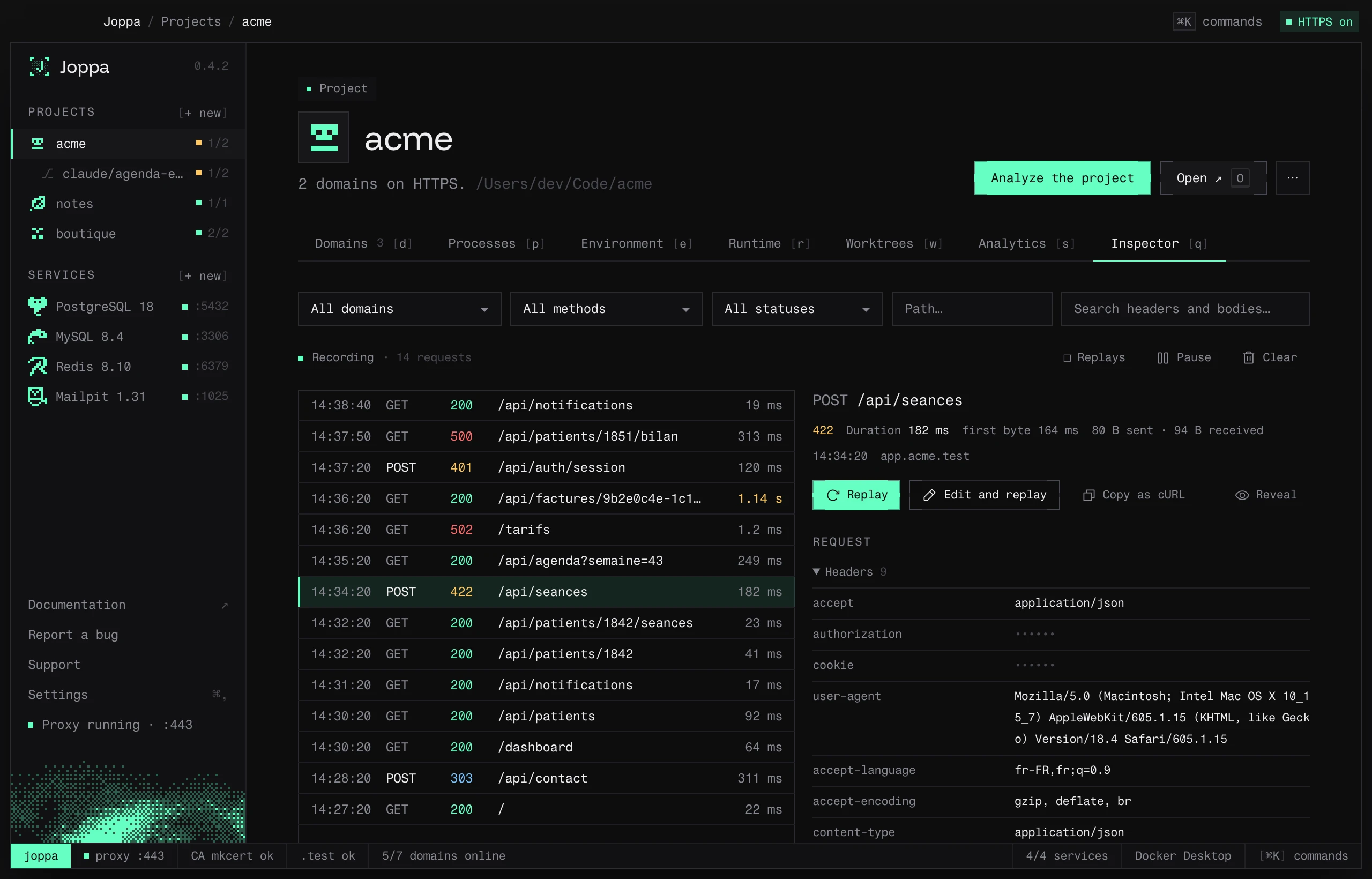
What is recorded
- Pages and API calls. Scripts, styles, images and fonts, and the dev server’s plumbing (hot reload, WebSockets, server-sent events), are left out, as in Analytics.
- For each request: the method, the path with its query, the status, the duration and the time to first byte, the request and response headers, and both bodies.
- The last 200 requests of each domain, with at most 8 MB of bodies per domain: the oldest go first.
- Each body is kept up to 64 KB. Past that, the inspector says so and gives its real size.
- A compressed body (gzip, deflate, brotli) is decompressed to be shown. A binary body (image, PDF…) is not shown: only its type and size are.
- When the dev server does not answer, the request shows with status 502 and the reason, for example “Connection refused: the dev server is not running”.
The list
Requests come in live, the most recent at the top. Above the list:
- Domain (when the project has several), Method and Status: 2xx, 3xx, 4xx, 5xx, or No answer when the dev server did not answer.
- Path… filters on part of the path, query included.
- Search headers and bodies… looks for text in the path, the headers and the bodies. Secret values (see below) are not searched.
- Replays shows only the replayed requests.
- Pause stops recording new requests, for every project; Resume starts it again. Replays are recorded even while paused.
- Clear empties the inspector of the project, or of the chosen domain.
A request’s detail
Click a request: on the right you get its status, duration, time to first byte, sizes sent and received, time and domain. Then, for the Request and the Response, the headers and the body. A JSON body is formatted; Raw shows it as it came.
Masked secrets
The values of the Authorization, Proxy-Authorization, Cookie and Set-Cookie headers show as ••••••. Reveal shows them, Mask hides them again. They are kept as they are in memory so that replays work.
Replay a request
Replay sends the request again as it was: same method, path, headers (secrets included) and body. It goes through the proxy to the dev server, as if the browser had sent it (with the same X-Forwarded-* headers), and shows at the top of the list with the replay badge. Its detail points to the original request (“replay of #12”); a click goes back to it. Replays count in Analytics too. The proxy must be running.
Edit and replay opens the request in a form before sending it:
- Method and Path (it starts with
/, query included); - Headers, one per line as
Name: value. A secret left as••••••keeps its original value; retype it to send another one, delete the line not to send it.Content-Lengthis computed again; - Body: a JSON body is offered formatted. A binary body is sent as it was.
The domain does not change: the request always goes to its domain’s dev server.
Copy as cURL
Copy as cURL puts on the clipboard a curl command to https://<domain><path> (with the port when the proxy does not listen on 443), its headers and its body. Accept-Encoding is replaced by --compressed, so the response is readable in the terminal.
curl -X POST 'https://app.acme.test/api/seances' \
  -H 'accept: application/json' \
  -H 'authorization: ••••••' \
  -H 'content-type: application/json' \
  --compressed \
  --data-raw '{"patientId":1842,"duree":45}'
Secrets stay masked in the command, unless you revealed them before copying. A cut or binary body is left out, with a comment line above the command that says so.