Share a site
Open a domain on a phone or a tablet on the same Wi-Fi with a QR code, or send it to someone through a public link (cloudflared, ngrok, localhost.run, Pinggy).
A .test domain only answers on your Mac. Share opens it elsewhere: on a phone or a tablet on the same network, to test the site for real, or on the Internet through a public link, to show it to a client or receive a webhook.
In a project’s Domains tab, click a row’s share icon: the Share <domain> window opens, with its two sections.
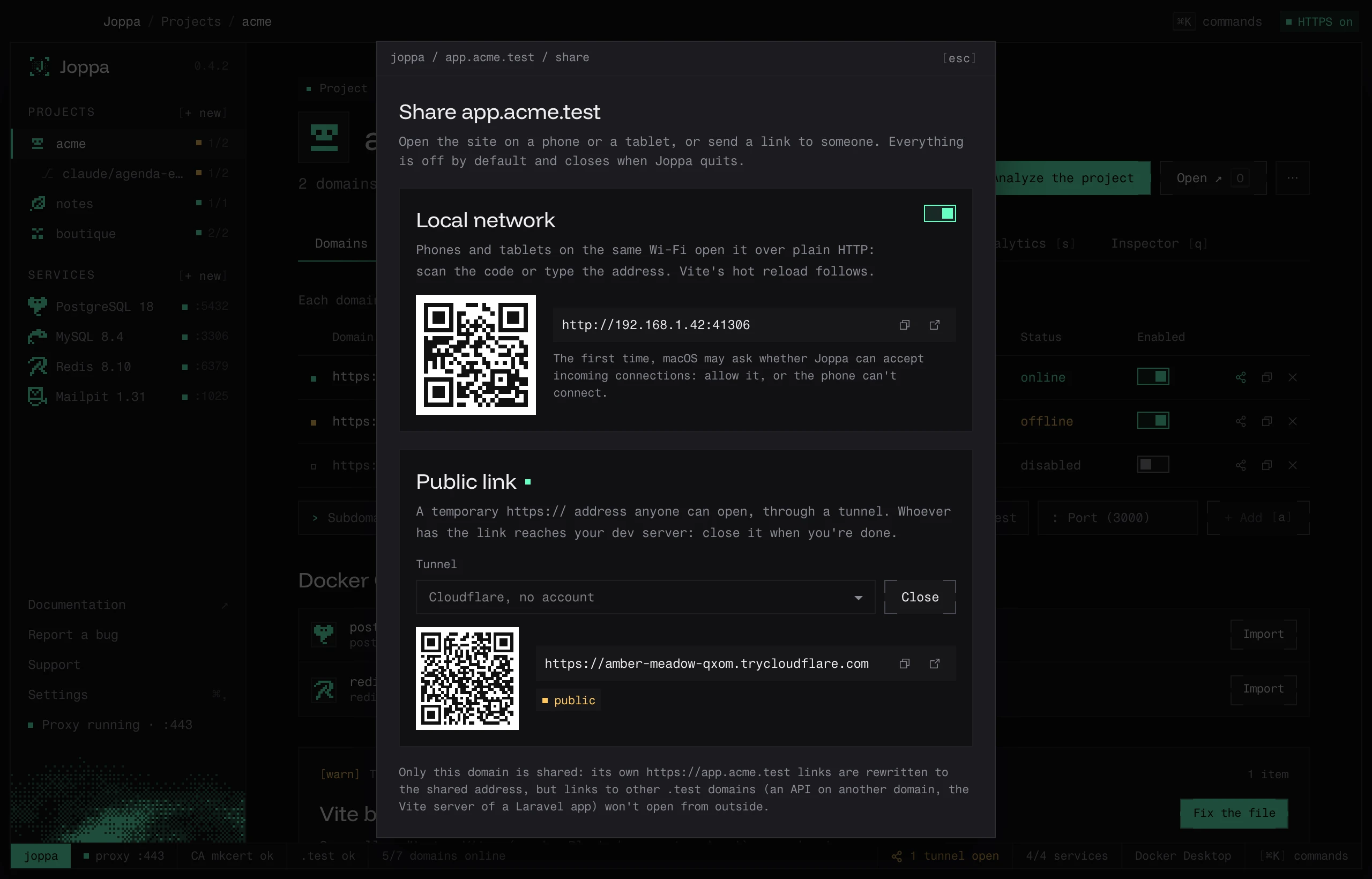
Everything is off by default and nothing is saved: shares live in memory and close when Joppa quits. The domain must be enabled and the proxy running.
On the local network
Turn on Share on the local network. Joppa opens a port on your Mac’s network address (Wi-Fi or Ethernet) and shows the address, for example http://192.168.1.20:41306, with a QR code. On the phone, connected to the same Wi-Fi, scan the code with the camera or type the address.
- One port per domain, always the same for a given domain (between 41000 and 41999) as long as it’s free: a bookmark on the phone keeps working from one time to the next.
- Over plain HTTP. The phone doesn’t trust Joppa’s certificate authority, which is installed on your Mac only: an HTTPS address would show a certificate error. For a secure context (service worker, camera,
crypto.subtle), use a public link, over HTTPS. - Hot reload follows. Vite’s HMR client (and those of Next.js, Astro…) reconnects to the address the page came from: its WebSocket goes through the same port, and the page on the phone updates when you save a file.
- Sharing is free.
Turning the switch off closes the port right away.
Public link
A public link gives a temporary https:// address that anyone can open, through a tunnel. It’s included in Joppa Pro; on the free version, the section shows “Public links come with Joppa Pro”. See License and plans.
Pick the Tunnel, then Open the tunnel. After a few seconds, the address shows with a QR code, a button to copy it and one to open it. Close stops the tunnel.
| Tunnel | Account | What you need |
|---|---|---|
| Cloudflare, no account (default) | none | cloudflared, which Joppa downloads if it’s missing |
| ngrok, your account | ngrok | ngrok installed (brew install ngrok) and your authtoken |
| localhost.run, no account | none | ssh, already on macOS |
| Pinggy, no account (60 min) | none | ssh; a free tunnel closes after 60 minutes |
- cloudflared: if it’s neither in the
PATHnor already downloaded, Download cloudflared fetches the version pinned by Joppa from Cloudflare’s GitHub releases (about 20 MB) and checks its SHA-256 before installing it in Joppa’s folder (see Files and folders). An archive whose checksum doesn’t match is deleted. - ngrok: paste your ngrok authtoken (dashboard.ngrok.com) and click Save; it’s kept in the keychain. Not needed if ngrok already has one (
ngrok config add-authtoken). ngrok’s free account shows visitors a warning page before the site. - localhost.run and Pinggy go through
ssh; Joppa keeps their host keys in its ownknown_hostsfile, without touching~/.ssh.
While a tunnel is open, the status bar shows it in orange (“1 tunnel open”); a click lists the shared domains, with Close for each one and Close all. The domain also carries the public badge in the list. If the tunnel client stops (network down, refused by the service), the window shows “The tunnel closed” with its last messages, and Retry.
What the app sees
Both kinds of sharing go through Joppa’s proxy, like your Mac’s browser:
- the dev server receives the domain’s
Host(app.acme.test) andX-Forwarded-Proto: https, whatever address was typed on the phone: Vite’sallowedHostsand Laravel’s or Symfony’s trusted hosts need no change; OriginandRefererare brought back to the domain, so that CSRF protections accept forms;- the requests show up in Analytics and in the Inspector.
The other way round, Joppa rewrites the domain’s absolute URLs to the shared address: https://app.acme.test/… becomes http://192.168.1.20:41306/… or https://….trycloudflare.com/…. This applies to redirects (Location), CORS and CSP headers, and the body of text responses (HTML, CSS, JavaScript, JSON, XML, SVG) up to 8 MB. Cookies lose their Domain attribute and, on the local network over HTTP, their Secure attribute (otherwise the phone would refuse them and the session wouldn’t hold).
In the terminal and for AI
joppa share app.acme.test
joppa share app.acme.test --public
joppa share stop app.acme.test
See The joppa command and the share_start, share_stop and share_status tools of the MCP server.